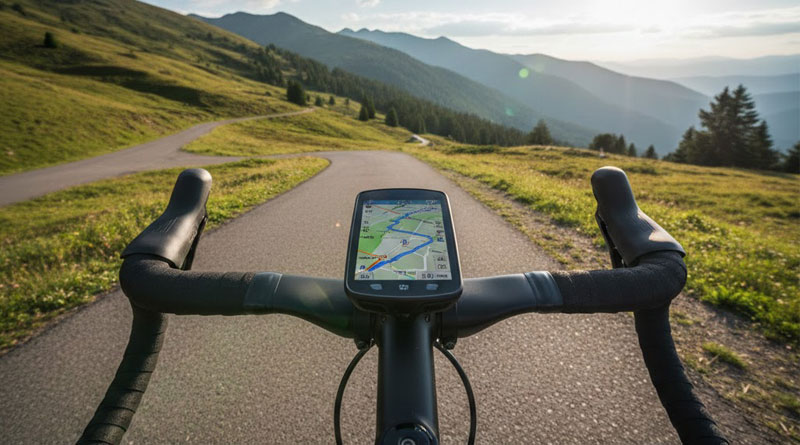
Best Cycling Computers for Navigation of 2026
A good cycling computer makes every ride easier. It helps you follow routes, track your speed, and stay on course. Many riders use it for exploring new places. Others rely on it for daily training. Today, there are many simple and smart options. They offer clear maps and helpful alerts. This guide shares the best cycling computers for navigation. It will help you choose one that fits your needs. Whether you are a beginner or experienced, you will find the right option here.
1. Magene C606 Smart Navigation
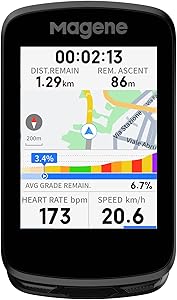
- Screen: 2.8-inch color touchscreen
- Connectivity: Bluetooth & WiFi
- Navigation: Amart navigation
- Smart Ecosystem: Intelligent device interactions
The Magene C606 positions itself as a premium, feature-rich navigation computer. Its standout 2.8-inch screen is not only large and vibrant but is also remarkably durable thanks to the Asahi glass, promising clear visibility and smooth touch operations in all conditions. The inclusion of both WiFi and Bluetooth is a significant advantage, with WiFi dramatically speeding up crucial tasks like map downloads and AGNSS data synchronization, which enables its impressive 5-second positioning.
Beyond core navigation, the C606 excels as a hub for a smart cycling ecosystem. Its ability to automatically trigger lights based on speed or provide haptic alerts from a connected radar is innovative and enhances safety. The turn-by-turn navigation with offline maps is robust for explorers. However, the full potential of features like automatic AGNSS sync requires a WiFi connection, which might not always be available on the road, and the ecosystem works best with other Magene accessories.
- Pros: Excellent, durable touchscreen; Very fast WiFi data transfer
- Cons: Ecosystem is most seamless with Magene-branded sensors/lights
2. COOSPO CS600 GPS Bike Computer

- Screen: 2.4″ touchscreen with auto-backlight.
- Battery: 36-hour battery life with 2-hour Type-C charging.
- Navigation: Built-in route navigation.
- Data & Sync: 150+ data insights
The COOSPO CS600 is a well-rounded computer that balances a strong navigation foundation with deep performance analytics. Its 2.4-inch touchscreen is responsive and the auto-backlight ensures good readability. The breadcrumb-style navigation is effective for following pre-loaded routes, helping to prevent wrong turns during exploration, though it lacks the detailed street maps of some higher-end models.
Where the CS600 truly shines is in its data presentation and athlete-focused connectivity. The ability to create a personalized data dashboard and access over 150 metrics makes it a powerful tool for structured training. The seamless automatic sync with popular platforms like Strava is a major convenience. The 36-hour battery is impressive for multi-day use. The navigation is functional but may feel basic compared to full map displays, and the screen size is smaller than some competitors.
- Pros: Excellent battery life; Strong data analytics and customization; Seamless app/site integration
- Cons: Navigation is breadcrumb-based, not full map; Smaller screen than some rivals.
3. iGPSPORT BSC300T Bike Navigation Computer

- Screen & Controls: 2.4″ touchscreen
- Positioning: Supports 5 satellite systems
- Navigation: Global offline map download
- Compatibility: Supports Ebike data display
The iGPSPORT BSC300T offers a compelling hybrid of touch and button controls, providing flexibility in all weather conditions. Its support for five global satellite constellations ensures fast and highly accurate positioning, a critical foundation for reliable navigation. The inclusion of global offline maps with turn-by-turn prompts is a significant feature at this price point, allowing for confident exploration without a phone connection.
This computer is notably versatile, catering to road cyclists, mountain bikers, and even e-bike riders who want to monitor power levels. The “off-course” warning is a helpful navigation safety net. With over 130 data fields, it provides ample detail for performance analysis and can share data to platforms like Strava. The interface, while functional, may not be as polished as some, and the map rendering can be simpler than on premium units.
- Pros: Versatile touch+button controls; Multi-satellite quick positioning
- Cons: User interface can be less intuitive; Map graphics are basic.
4. GEOID CC600 Cycling Navigation Computer

- Screen: 2.4” screen
- Positioning: 5 satellite systems
- Data Display: Highly customizable graphic data fields
- Features: Colorful route navigation
The GEOID CC600 is a data enthusiast’s dream wrapped in a capable navigator. Its screen is crisp and durable, and the navigation is feature-packed, offering colorful turn-by-turn guidance with helpful pop-ups and automatic re-routing—a premium feature that keeps you on track effortlessly. The 5-second positioning, aided by WiFi AGNSS sync, gets you riding faster.
Where the CC600 stands out is its incredible display customization. With support for numerical charts, circular dials, and bar graphs across numerous layouts, you can tailor the data view like few other computers. Its dual-purpose nature is also a plus, doubling as a head unit for controlled indoor training sessions with a smart trainer. The main trade-off is that its extensive features require some time to set up and learn fully.
- Pros: Superb data screen customization; Auto re-routing navigation.
- Cons: Steeper learning curve due to extensive features; Setup can be time-consuming.
5. COOSPO CS500 Bike Navigation Computer

- Screen: 2.6-inch graphical grid display with auto-backlight.
- Battery Life: Extended 45-hour battery life.
- Navigation: Intuitive system with preloaded maps and turn prompts.
- Safety: Supports bike radar integration for rear vehicle alerts.
The COOSPO CS500 focuses on delivering reliable navigation and exceptional battery life in a user-friendly package. Its 2.6-inch screen offers a good balance of size and clarity, with an auto-backlight for low-light riding. The preloaded maps and turn prompts provide straightforward guidance, making it a great “set and forget” navigator for known routes or simple exploration without the complexity of full map management.
With a staggering 45-hour battery, the CS500 is ideal for endurance riders, bikepackers, or anyone who dislikes frequent charging. The addition of radar support is a major safety boost, alerting you to traffic from behind. It also tracks a comprehensive set of over 140 metrics. However, its navigation is more basic than true interactive map systems, and the screen is not a touchscreen, relying on button controls which some may find less intuitive.
- Pros: Outstanding battery life; Simple, effective navigation; Bike radar compatible; Large, clear display.
- Cons: Navigation lacks detailed maps; Button-only controls (no touchscreen).
6. Magene C506 GPS Bike Computer

- Design: 2.4” touchscreen with 3 buttons.
- Connectivity: Bluetooth & WiFi .
- Navigation: Advanced smart navigation.
- Positioning: Swift 5-second positioning.
The Magene C506 is essentially a more compact sibling to the C606, packing most of the high-end navigation and smart features into a smaller, lighter body. Its 5-second positioning via WiFi AGNSS is impressive, and the dual-band WiFi ensures maps and data transfer rapidly. The turn-by-turn navigation with downloadable global maps is robust, making it a powerful tool for serious touring and exploration.
It retains the smart ecosystem features, allowing control of Magene lights and providing hydration reminders. It also doubles as an indoor training head unit. The compact size is a boon for riders who prefer a less obtrusive handlebar presence. The trade-off for the smaller size is a smaller screen, which can make map viewing slightly more challenging, and some may find the interface a bit crowded given the multitude of features packed in.
- Pros: Very compact and lightweight; Fast positioning and data sync; Full-featured global navigation.
- Cons: Smaller screen can be harder to read at a glance; Feature-dense interface has a learning curve.
7. iGPSPORT BSC200S GPS Bike Computer

- Screen: 2.4″ semi-transmissive color screen for clarity in sunlight.
- Navigation: One-touch navigation.
- Convenience: “Continue Last Ride” function.
- Battery: 25-hour battery life with 1.5-hour Type-C charging.
The iGPSPORT BSC200S is a value-oriented computer that emphasizes practical navigation and rider convenience. Its screen is specifically designed to be easily readable in bright sunlight, a common pain point for many units. The navigation features are cleverly implemented, with “one-touch” navigation to saved points and the ability to resume a previous ride being particularly useful for casual or commuting cyclists.
It covers all the essentials: importing routes from popular apps, providing turn and off-course alerts, and delivering basic smart notifications. Integration with iGPSPORT lights adds a layer of safety. With over 100 data fields and a 25-hour battery, it handles most rides. However, it does not support offline map downloads, relying instead on a breadcrumb trail for navigation, which is less detailed. The build and interface feel more utilitarian than premium.
- Pros: Excellent sunlight-readable screen; Very convenient one-touch and resume-ride features.
- Cons: No offline maps (breadcrumb navigation only); Build quality and UI feel more basic.
How to Choose Cycling Computers for Navigation
Selecting the right cycling computer for navigation can feel overwhelming with so many models, features, and brands available. A good cycling computer does much more than show speed and distance—it helps you plan routes, stay on track, and ride with confidence. To choose the right one, you need to understand your riding style, the type of navigation you want, and which features will truly benefit you. This guide breaks everything down clearly so you can make a confident choice.
Understanding Your Navigation Needs
Before comparing devices, you must know what you expect from your cycling computer. Every rider has different goals, and navigation requirements vary widely.
Casual Riders
If you enjoy relaxed weekend rides and prefer simple routes, a basic cycling computer with breadcrumb navigation may be enough. It shows your general direction without detailed maps. These models are affordable and easy to use.
Commuters
Daily commuters need reliable, real-time navigation with clear turn-by-turn prompts. A computer with detailed maps, traffic updates, and rerouting features makes everyday travel smoother and safer.
Adventure and Long-Distance Riders
For gravel, touring, or multi-day rides, you need robust navigation features. This includes full offline maps, rerouting, weather alerts, and long battery life. Durability and large displays also matter.
Competitive Cyclists
Racers often want advanced performance metrics alongside navigation. If you regularly participate in events, look for computers that integrate with power meters, training apps, and route planning platforms while still offering precise GPS navigation.
Key Features to Look For
Cycling computers come with a wide range of features. Understanding which ones matter will help you choose wisely.
GPS Accuracy
A good navigation computer must have fast and accurate GPS. The best devices use multi-band GNSS, offering stronger signals and reliable tracking even in forests or cities with tall buildings.
Display Quality
A clear, readable screen is essential. Consider screen size, brightness, and whether it performs well in sunlight. Touchscreens are convenient, but button-only designs work better in rain or with gloves.
Battery Life
Battery performance varies widely. If you ride long distances or multiday routes, look for at least 15–20 hours of battery life. Some models also support power banks or solar charging.
Mapping and Routing
High-quality, detailed maps help you follow routes smoothly. Some models offer built-in maps, while others require downloads. Rerouting is also critical; if you miss a turn, the device should suggest a new path automatically.
Display and Interface Options
The way your cycling computer shows information affects your riding experience. Two major things to consider are display type and interface style.
Touchscreen vs Physical Buttons
Each option has its strengths. Touchscreens feel modern and allow quick navigation through menus, but they can become less responsive in rain or with gloves. Button-based computers are more reliable in harsh conditions and generally preferred by mountain and gravel riders.
Screen Size and Resolution
Larger screens are easier to read, especially for navigation maps. However, they increase device size and may look bulky on smaller handlebars. High-resolution screens show sharper maps and clearer details, which helps during complex routes.
Map and Navigation Capabilities
Navigation is the heart of your cycling computer. The more advanced the mapping system, the easier your rides will be.
Preloaded Maps
Many mid- to high-range cycling computers come with preloaded country or region maps. These allow you to start riding anywhere without downloading additional data.
Offline Navigation
If you often ride in areas without network coverage, offline maps are essential. You should be able to download detailed maps and routes directly to the device.
Turn-by-Turn Guidance
This feature gives clear instructions before each turn, similar to car navigation systems. It helps reduce wrong turns and keeps your focus on the road.
Connectivity and Integration
Modern cycling computers work best when connected with other devices and apps. Good connectivity expands your options.
Bluetooth and ANT+ Support
These connections allow you to link heart-rate monitors, speed sensors, cadence sensors, and power meters. Look for dual connectivity for broader compatibility.
Smartphone Integration
Your cycling computer should sync with your phone for notifications, weather updates, and app integration. This lets you plan routes on your phone and send them directly to the device.
Third-Party App Compatibility
Apps like Strava, Komoot, and TrainingPeaks are popular among cyclists. If you use them, ensure the computer supports easy syncing and route transfers.
Durability and Build Quality
Cycling computers must survive rough rides, rain, heat, and vibrations. Build quality is important for long-term use.
Water and Dust Resistance
Look for devices with an IPX7 or higher rating. This ensures protection from heavy rain and splashes.
Mounting Quality
The mount should be secure and stable, keeping the computer from shaking on rough terrain. Some devices come with aerodynamic out-front mounts for better visibility.
Temperature and Weather Resistance
If you cycle in extreme weather, choose a model that operates well in heat and cold without losing performance.
Budget and Value
Cycling computers vary drastically in price. Deciding your budget early helps narrow your choices.
Entry-Level Options
These offer basic navigation and essential riding metrics. They suit beginners and casual riders.
Mid-Range Models
These offer full mapping, longer battery life, and better displays. They are ideal for regular riders who want reliable navigation.
Premium Devices
High-end cycling computers offer advanced mapping, large screens, performance analytics, and excellent integration. They are perfect for serious cyclists and professionals.
Conclusion
Choosing the right cycling computer for navigation depends on your riding goals, preferred features, and budget. Start by understanding your needs, then compare displays, mapping tools, battery life, and connectivity options. Consider durability and app integration to ensure the device fits your riding style. Whether you’re a beginner or a seasoned cyclist, the right navigation computer will make every ride smoother, safer, and more enjoyable. With the right choice, you can confidently explore new routes and take your cycling experience to the next level.